Posts

Passing the RHCT / RHCE Exams

Get Started 1) Take the Red Hat Training Courses (optional) 2) Study the objectives https://www.redhat.com/training/rhce/examprep.html 3) Find some good reference materials https://www.redhat.com/docs/manuals/enterprise/ 4) Practice, practice, practice How can you make a study guide? Make some notes based on the objectives, labs, and potential questions. 1) Look at an objective 2) Ask yourself "what could they ask me to prove I know this objective?" 3) Write up as many potential questions, and answers as you can think of 4) Write down any supporting commands for configuring, testing or troubleshooting 5) Write down any files required for configuration 6) Test your theories, and try things out 7) Think about how you can test each of the changes you make to the system Configuration Tips Get a PC you can install and reinstall the OS on. Learn what tools and files are used to configure a system.

OpenSource Software for Windows

Image
Linux users are familiar with OpenSource, and the Free Software Foundation , but many Windows users still have no idea how much free software is available. Sure freshmeat.net is always a good resource for sysadmins and power users, but beginners just want to know how to use their computer, and have no idea what software to use. There are a few nice lists of software when searching Google for "open source software windows": http://www.opensourcewindows.org Top 10 open source Windows apps" http://osswin.sourceforge.net http://www.opensourcelist.org/oss/suggestedapplications.html http://www.myopensource.org And there are free CD's available for download from http://www.theopencd.org and http://www.winlibre.com/en/Articles/Download/index_download.php If you really want more, after searching freshmeat.net and sourceforge.net, check out the directory of software http://directory.fsf.org , which has over 5,000 entries so far. They are not listed by OS, but there are plen...

Collection of stupid quotes made by clients during the Dot Com days.

This is a great thread from 2000, archived from the old Design Forum site, Dreamless. read more | digg story

College Credit for IT Certifications

Image
Did you know, you can receive undergraduate credit for IT Certifications? I was so happy to find out about this. I had taken off a few semesters from school to work on my certs. I had completed my CNE and was working on my MCSE, when I found out I could get credit for some of the exams. The coolest part was, that I didn't really lose any time by getting my certs. I was able to combine the best courses from some very good universities for a more well-rounded education. Ways to Earn Credit Earn undergraduate credit through Excelsior College courses and Excelsior College Exams, credit earned at other regionally accredited institutions, military training, corporate training, technology certification, and more. You may be closer than you think to earning your degree! This looks like an add, but it is more of a personal endorsement. I highly recommend looking into this for any IT person who has not completed their degree yet. You have to keep up with certifications anyway, so why ...

Free Screenshot Tips

Image
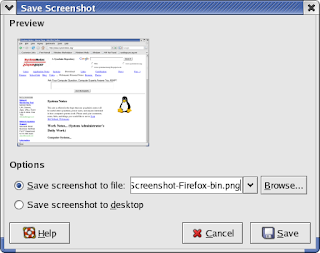
Did you know... that you can take a screen shot of the current window in Windows, or Linux (Gnome) by pressing Alt-PrintScrn? Use Alt-PrintScrn to take a shot of the current window. For the whole screen, try PrintScrn by itself. Windows In any version of Windows, since 95, pressing Alt-PrintScrn copies the current window to the clipboard. To get the image into something useful, you can open paint, and paste it in (ctrl-v). Then select any tool to de-select the "Select" tool, and then re-select it. Mark the area you want to keep, and cut it (ctrl-c) -- that puts the new selection on the clipboard. Now start a new file (save changes - no), shrink the box so your selection fills the box, and paste it in (ctrl-v). Linux Linux is not much different. In Gnome: Press Alt-PrintScrn, and a dialog box appears that prompts the user to save the image to a file. If you have KDE installed you can use KSnapshot...

Searching for Software

An easy way to find free Open Source software is check out http://freshmeat.net Another place to look is http://sourceforge.net

Unix / Linux Command Tips

When you're stuck, just remember "I'm a helpless man" Most commands allow the option "--help", which can then be redirected to "less" (or "more") e.g. cat --help | less To see the man page (more detailed help) for a command type "man" followed by the command e.g. man cat What if you don't remember the name of the command, but you know it was something like lvm? Try apropos apropos lvm What if the man page is the right name, but it displays something about c programming? Use the -a option, and press q until you get the the correct man page. man -a cat For more information look for a HOWTO or other documentation at the Linux Documentation Project -- http://www.tldp.org