Posts

Showing posts with the label windows

Free AntiVirus and AntiSpyware Software

Image
Computers running Windows seem to have virus and spyware problems quite often. When fixing other peoples computers, I have found these free options to be very useful. Free Windows Anti Virus Software ClamWin Free Antivirus http://www.clamwin.com ClamWin is a Free Antivirus program for Microsoft Windows 7 / Vista / XP / Me / 2000 / 98 and Windows Server 2008 and 2003. avast! Free Antivirus http://www.avast.com Free Anti-Adware / Anti-Spyware Information Some of this Windows software is offered as a free version, with an option to upgrade. Generally, the free version is enough to clean any problems, but has to be run manually. Ad-Aware – check for updates, and run occasionally http://www.lavasoftusa.com Spy Bot Search and Destroy http://www.safer-networking.org Malwarebytes http://www.malwarebytes.org Malwarebyes Anti-Malware is often the best tool to remove fake anti-virus software. Super Anti Spyware http://www.superantispyware.com Super Anti Spyware: ...

How to Copy and Paste in Linux and Windows

Image
This is a very simple topic, but sometimes little tips can save you a lot of time. Windows & Linux First select the text, or item, or location to paste to: Copy = Ctrl-c, or From the "Edit" menu, select "Copy" Cut = Ctrl-x, or From the "Edit" menu, select "Cut" Paste = Ctrl-v, or From the "Edit" menu, select "Paste" You can copy and paste text, graphics, files, etc. In Windows, you can copy and paste files within Windows Explorer, or you can drag and drop them. Linux All of the above, plus: Copy = Select text with the mouse Paste = Click the middle mouse button vi If you want to copy and paste in vi, that's another topic. To copy a line in vi, type yy (yank line), and then p (paste after), or P (paste before). To copy a word, use yw (yank word). To copy five lines -- 5 yy, or five words -- 5 yw, or to paste something five times 5p. Here are some good tips on vi http://www.vim.org/tips/tip.php?tip_id=312 . By t...

Use Cygwin to Run Linux on Windows

Yes, not only can you run Linux from a CD -- http://systemnotesorg.blogspot.com/2007/04/how-to-get-started-with-linux.html , but you can also install it in Windows, and run it as a Windows program. You get a standard linux bash shell, and even X, with a little configuration. What Is Cygwin? (from http://cygwin.com ) Cygwin is a Linux-like environment for Windows. It consists of two parts: A DLL (cygwin1.dll) which acts as a Linux API emulation layer providing substantial Linux API functionality. A collection of tools which provide Linux look and feel. The Cygwin DLL currently works with all recent, commercially released x86 32 bit and 64 bit versions of Windows, with the exception of Windows CE. Note that the official support for Windows 95, Windows 98, and Windows Me will be discontinued with the next major version (1.7.0) of Cygwin. What Isn't Cygwin? Cygwin is not a way to run native linux apps on Windows. You have to rebuild your application from source if you want it to r...

How to Get Started with Linux

Have you always wanted to find out more about linux, but were not sure where to start? Here is a little information on where to find, and how to run and / or install a linux distribution. What is Linux? Linux is the kernel, or core part of an operating system that is free from any software licenses. Free to download, and install on as many machines as you like. Here's an explanation from http://www.gnu.org/ The GNU Operating System - Free as in Freedom What is the GNU project? The GNU Project was launched in 1984 to develop a complete Unix-like operating system which is free software: the GNU system. Variants of the GNU operating system, which use the kernel called Linux, are now widely used; though these systems are often referred to as "Linux", they are more accurately called GNU/Linux systems. GNU is a recursive acronym for "GNU's Not Unix"; it is pronounced guh-noo, approximately like canoe. Trying Linux First, you may not have known that ...

OpenSource Software for Windows

Image
Linux users are familiar with OpenSource, and the Free Software Foundation , but many Windows users still have no idea how much free software is available. Sure freshmeat.net is always a good resource for sysadmins and power users, but beginners just want to know how to use their computer, and have no idea what software to use. There are a few nice lists of software when searching Google for "open source software windows": http://www.opensourcewindows.org Top 10 open source Windows apps" http://osswin.sourceforge.net http://www.opensourcelist.org/oss/suggestedapplications.html http://www.myopensource.org And there are free CD's available for download from http://www.theopencd.org and http://www.winlibre.com/en/Articles/Download/index_download.php If you really want more, after searching freshmeat.net and sourceforge.net, check out the directory of software http://directory.fsf.org , which has over 5,000 entries so far. They are not listed by OS, but there are plen...

Free Screenshot Tips

Image
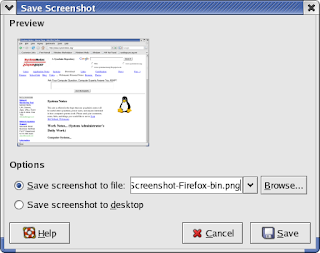
Did you know... that you can take a screen shot of the current window in Windows, or Linux (Gnome) by pressing Alt-PrintScrn? Use Alt-PrintScrn to take a shot of the current window. For the whole screen, try PrintScrn by itself. Windows In any version of Windows, since 95, pressing Alt-PrintScrn copies the current window to the clipboard. To get the image into something useful, you can open paint, and paste it in (ctrl-v). Then select any tool to de-select the "Select" tool, and then re-select it. Mark the area you want to keep, and cut it (ctrl-c) -- that puts the new selection on the clipboard. Now start a new file (save changes - no), shrink the box so your selection fills the box, and paste it in (ctrl-v). Linux Linux is not much different. In Gnome: Press Alt-PrintScrn, and a dialog box appears that prompts the user to save the image to a file. If you have KDE installed you can use KSnapshot...